

What is an AI Algorithm?
Definition: It’s a set of steps to reach a goal

Welcome to definition #3 of the AI Dictionary Detail(ed) series. This primer defines AI algorithms.
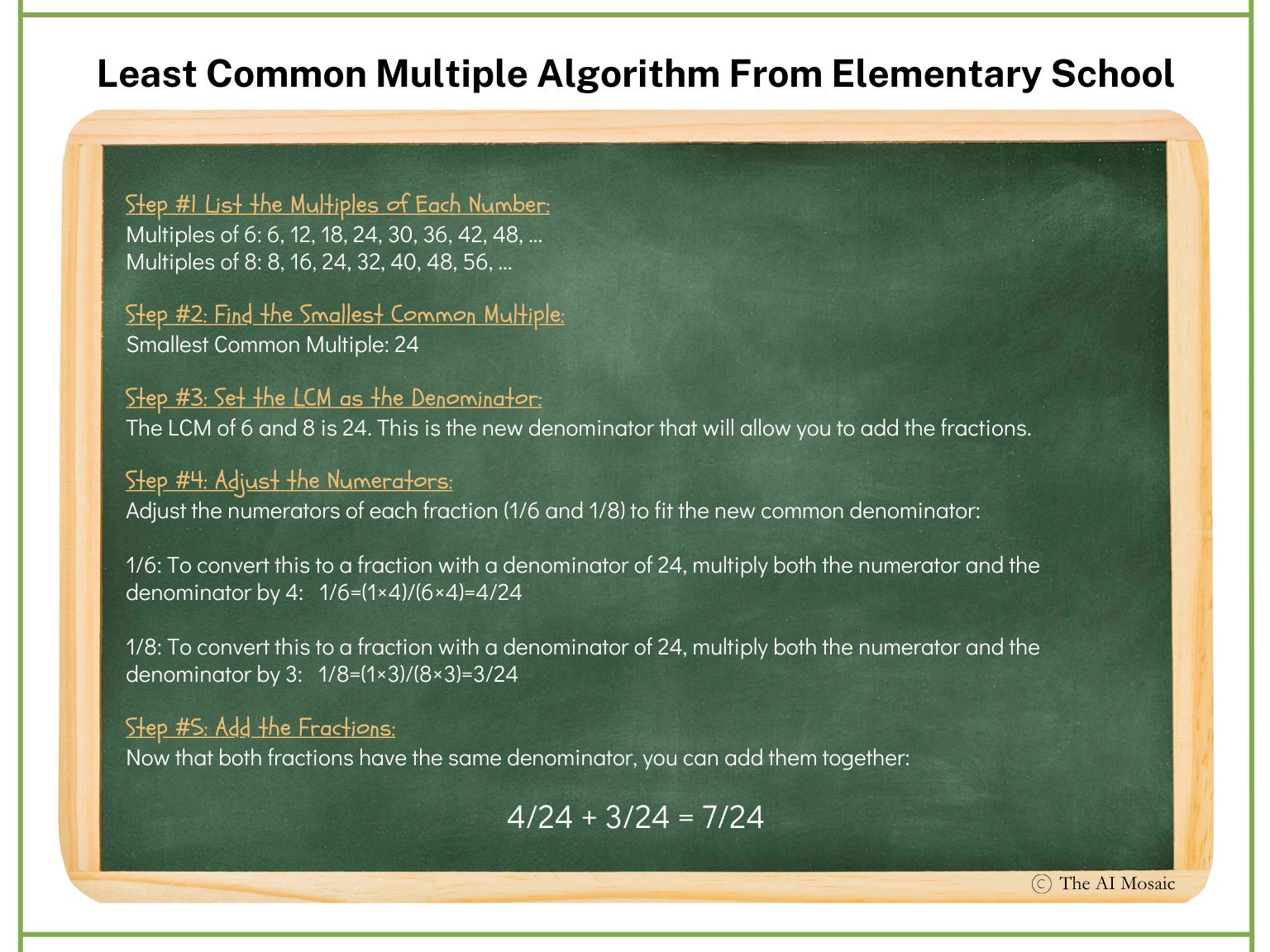
Remember adding fractions in elementary school? If you had to find a common denominator before adding them, guess what—you were using the LCM algorithm! For example, when adding 1/6 and 1/8, you needed to find the Least Common Multiple (LCM) of 6 and 8, which is 24, to get the fractions ready for addition. Ring a bell? That’s an algorithm in action—a simple set of steps to solve a problem.
And it doesn’t stop in 6th grade. Algorithms are part of everyday life. Ever follow a recipe to bake a pie? That’s another algorithm at work—a series of steps that, when followed correctly, lead to a desired (and tasty) outcome. Or think about playing chess. Each time you decide to move a piece, you’re following a mini-algorithm in your head, like ‘If my opponent moves their knight here, I’ll move my bishop there.’ You’re making decisions based on a series of steps that guide you toward winning the game.
Understanding a Computer Algorithm
Just as we use algorithms in our everyday lives, computers rely on them to perform all sorts of tasks. There are many, many computer algorithms, but one basic example is the QuickSort algorithm. It’s a fast and efficient sorting method that could alphabetize a list, for instance. Let’s imagine we need to alphabetize this list of movies.
"The Matrix"
"Inception"
"Avengers: Endgame"
"Interstellar"
"Toy Story"
"Batman Begins"
"Jurassic Park"
"The Dark Knight"
"Frozen"
When written in a computer program like Python, the QuickSort algorithm might resemble something like the image below:
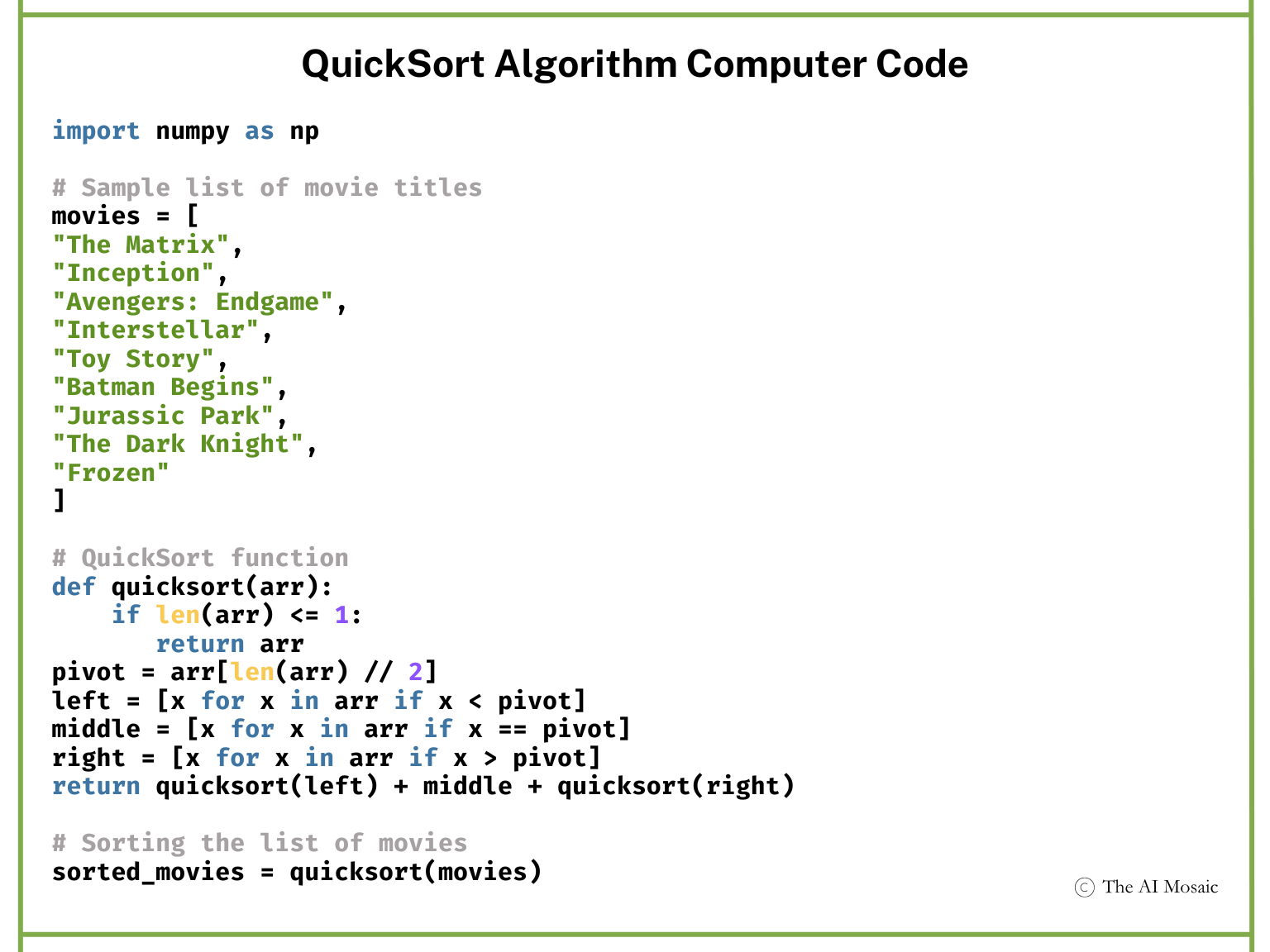
What you’re looking at is Python-speak for a series of fixed steps the computer will take to alphabetize the list. But let’s cut through the code and explain it in plain English. How does a computer manage to alphabetize a list? Well, first, it has to think like a computer—because, unlike us, it didn’t sit through grade school spelling lessons.
The QuickSort Algorithm is Recursive
It’s what? Before explaining the steps of the algorithm, it's important to understand that the QuickSort algorithm follows a distinct, repetitive process, known as recursion. At each step, when alphabetizing the movie list, the algorithm selects a “pivot” movie title and divides the list into smaller sub-lists. These sub-lists are based on whether the titles come before or after the “pivot” alphabetically.
The algorithm then applies the same sorting process to each sub-list over and over again until all the sub-lists are small enough to sort easily. This step-by-step, repetitive process is key to how the algorithm efficiently alphabetizes the entire list of movie titles.
The following steps describe the recursive process of the QuickSort algorithm’s process for alphabetizing a list of movies.
Step 1: Selecting a “Pivot”
The first step? The computer chooses a pivot point. The pivot is just an item from the list that acts as a reference for sorting the other items. It’s like picking a word from the middle of the list to get the sorting process going. For instance, if we’re alphabetizing the list of movie titles, the computer might choose “Interstellar” as its pivot point.
Step 2: Comparing and Splitting
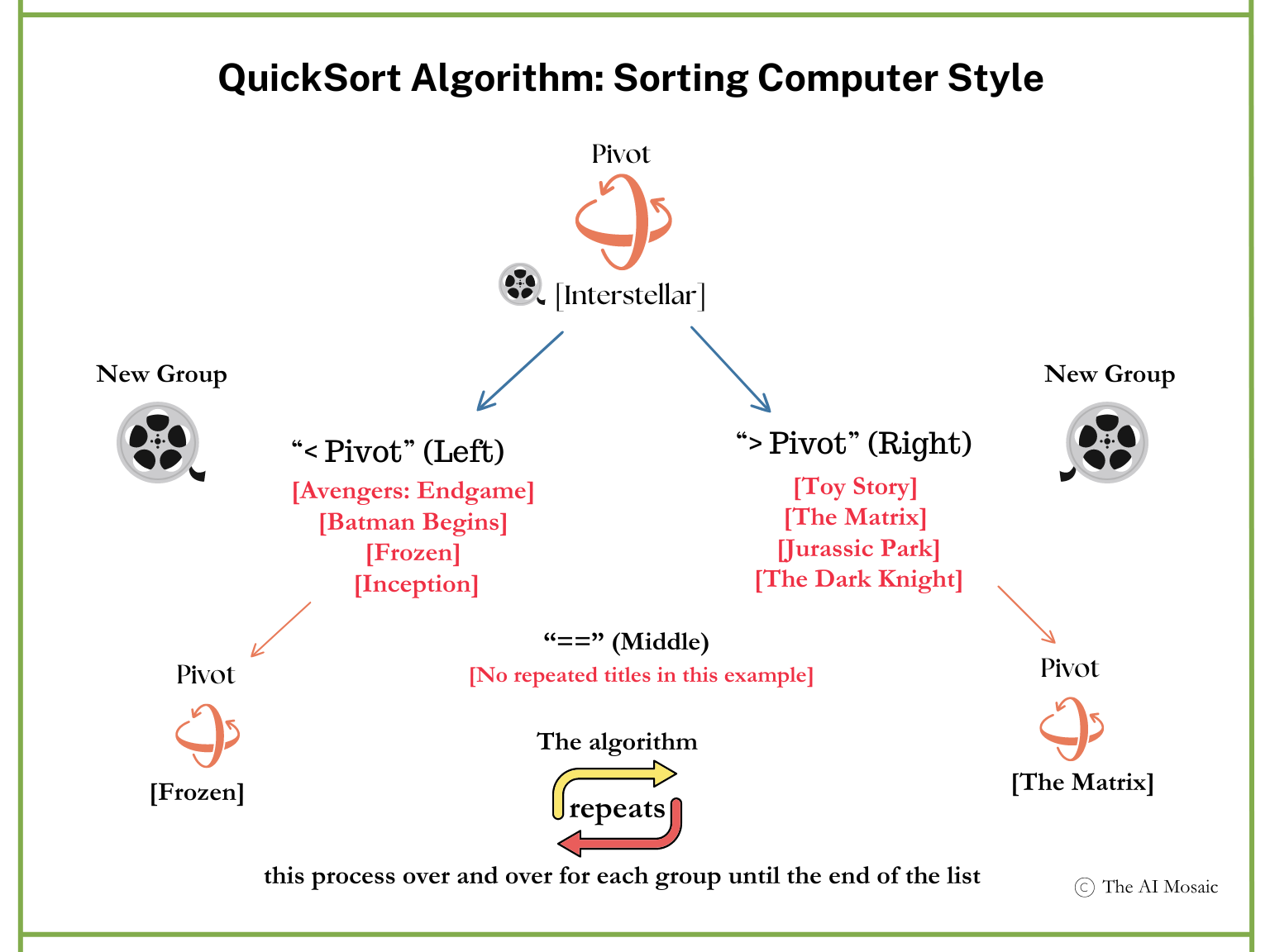
Once the pivot is chosen, the computer compares the other movie titles to the chosen pivot. But here’s where it gets a bit quirky. The computer doesn’t think about words like humans do. Instead, it uses symbols like < (less than), > (greater than), and == (equal to) to figure out where each movie title belongs in an alphabetized list. This is how the algorithm thinks:
Titles that come before "Interstellar" alphabetically (like "Avengers: Endgame" and "Frozen") are considered less than the pivot and are placed in a "left" group.
Titles that come after "Interstellar" alphabetically (like "The Matrix" and "Toy Story") are considered greater than the pivot and go into a "right" group.
If there are any repeated movie titles (e.g., if two movies had the same title), they get placed in a middle group using the == symbol, though that doesn’t happen in this example.
The sorting process is depicted in the graphic below:
Step 3: Repeating the Process
The computer doesn’t stop after the first split as shown in the above picture. Instead, it repeats the process. It picks new pivots in each group—left and right—and continues comparing and splitting until each group has only one movie title left. This means it breaks the list down into smaller and smaller chunks with each step.
Step 4: Handling Repetition
If there were any duplicates in the list (let’s say "Frozen" appeared twice), the algorithm would place identical items together in the middle group. This ensures that repeated movie titles don’t get lost during the sorting process.
Step 5: Putting it All Back Together
After the computer has split the list into individual pieces, it finally pieces them all back together in order—left group + middle group + right group. When all is said and done, the movie titles are neatly alphabetized: “Avengers: Endgame,” “Batman Begins,” “Frozen,” and so on, all the way to “Toy Story.”
This is one example of how a computer algorithm works. Even though the QuickSort algorithm seems more complex than the simple steps a human would take to alphabetize a list, it has the advantage of speed. The algorithm can sort a lengthy list far faster than a person could—especially when dealing with hundreds or thousands of items.
AI Algorithms: Fixed Rules and Adaptable Steps
So far, we have reviewed algorithms we encounter in daily life and an example of a basic computer algorithm. As we saw with QuickSort, a basic algorithm contains fixed rules for a set of steps designed to achieve a specific goal. However, AI algorithms take this a step further. They also follow a set of instructions, but they can change their steps along the way based on new information. As AI algorithms come upon more data, they can adjust the importance they give to different factors they evaluate to produce more accurate predictions. AI algorithms help computers make “smarter” and more flexible decisions.
Let’s consider two AI algorithms that we've probably all come across in our daily lives.
Decision Tree Algorithm: Will I get the job?
If you’ve ever submitted your resume online to a recruiter, you may have run into the Decision Tree Algorithm. This is an example of a pattern recognition algorithm that helps recruiters find the right job applicants. Used in recruitment software, the algorithm filters and ranks the resumes it processes. If you’ve ever wondered what’s in that black hole that your resume travels through to get you hired, look at the sample computer code below—it could be deciding your future job.
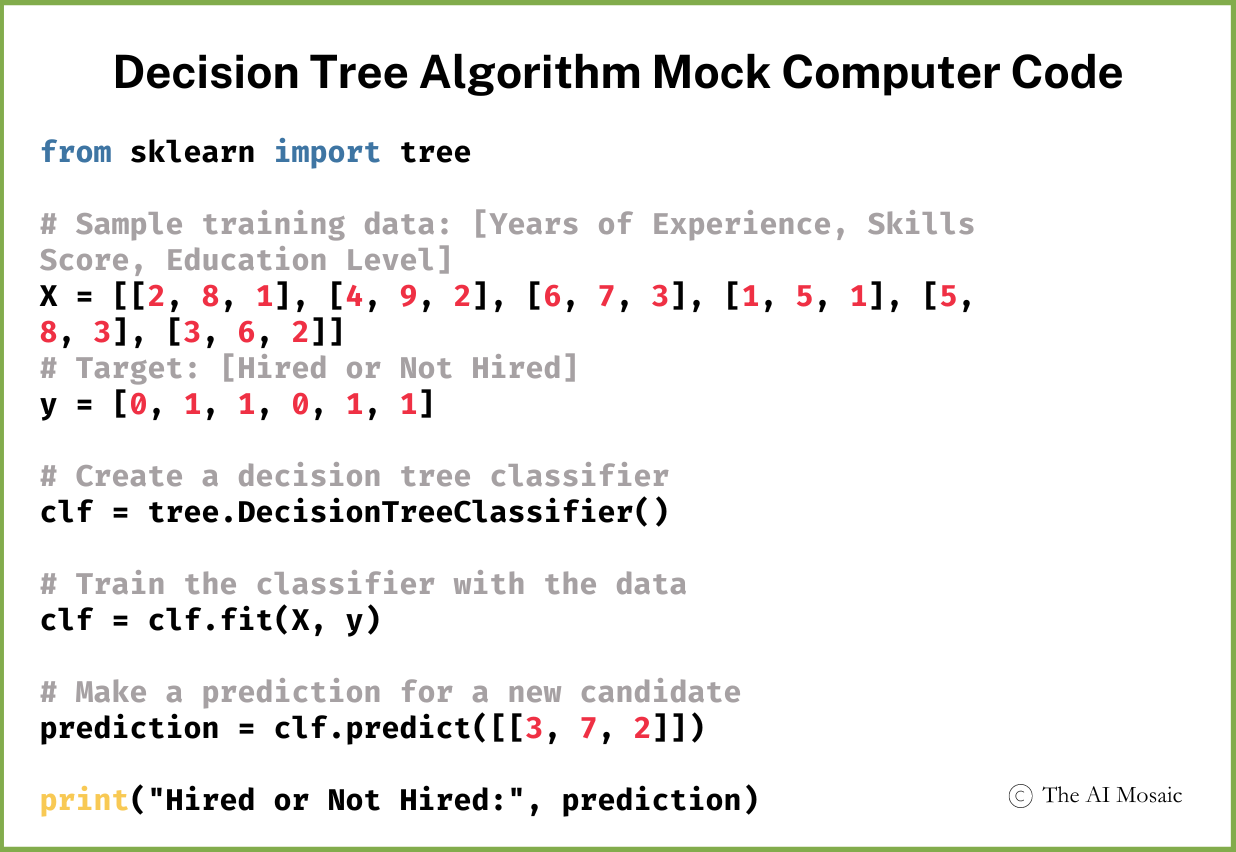
What’s the Decision Tree algorithm up to?
The algorithm is looking for patterns in resumes to predict who might be a good hire for the employer. In this example, it’s looking at years of experience, skills, and education level to evaluate a candidate. It builds a model based on these factors to predict an outcome: “Hired or Not Hired.”
The Decision Tree Algorithm: Step-by-step
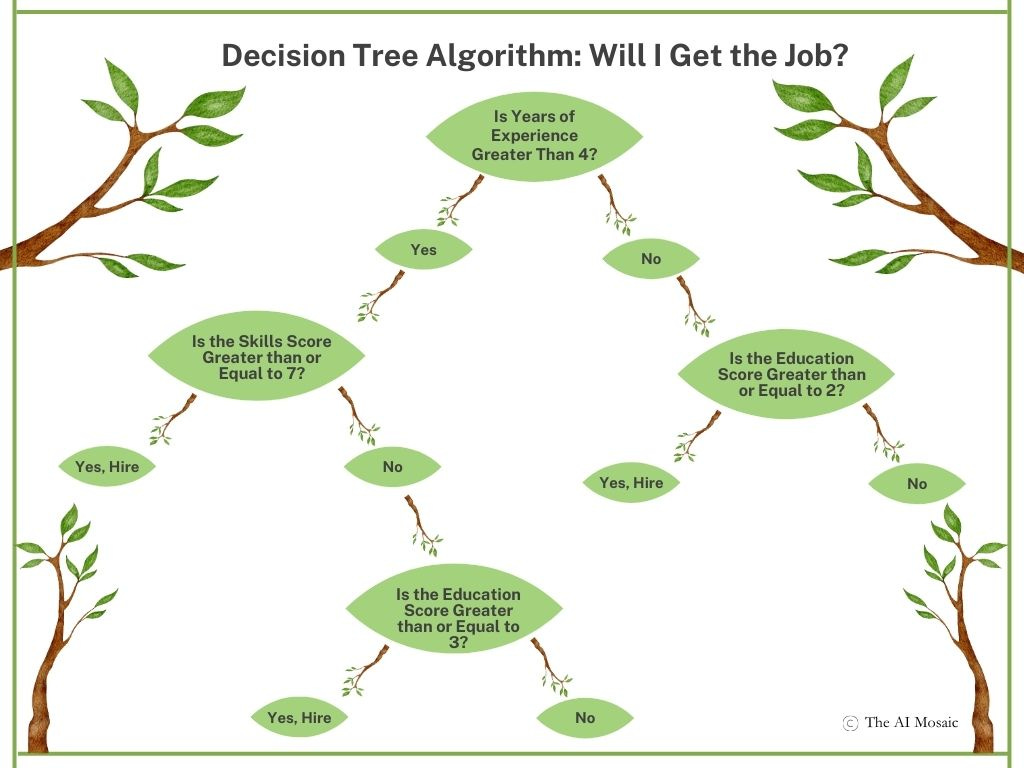
The Decision Tree Algorithm operates like a flowchart making decisions step by step. It begins by selecting a feature to split the resumes into groups.
Feature #1:
In this example, it might first look at years of experience. It asks a yes/no question like, “Does this candidate have over 5 years of experience?” Candidates with over 5 years go one way on the "tree," and those with under 5 years go another way.
Feature #2:
Next, for each group, it might ask another question—like “Does the candidate have a skills score above 7?” For example, if a candidate has listed a specific certification (e.g., Certified Financial Planner) on their resume, the algorithm might ask, "Does this candidate have a CFP Certification?" The algorithm routes candidates with the certification one way, and those without it go another way.
Feature #3:
Alternatively, the algorithm might ask, "Does the candidate have a college degree?" Candidates with higher education would go down one path while those without would go down a different path.
To help you better understand this concept, imagine the process visually with the graphic below.
Eventually, No More Decisions Remain
This process continues down the tree, splitting candidates into smaller groups with every decision point (like branches). Eventually, when the algorithm can't break the group down any further, it makes its final decision - “Hired” or “Not Hired” - based on the information it has processed. Just like with the QuickSort algorithm, the decision tree keeps splitting the data into smaller and smaller groups, but instead of alphabetizing, it’s predicting whether you're the right fit for the job.
The Tree Learns Over Time
The Decision Tree Algorithm is an AI tool because it improves as it’s exposed to more resumes and hiring managers’ decisions. If a hired candidate is successful, the algorithm adjusts its decision-making process by giving more weight to the candidate’s features (such as a certain skill set or education level). Over time, the algorithm becomes better at predicting who will make a good hire.
And so, dear job applicant, it's crucial for you to become better at anticipating the algorithm's criteria.
K-Nearest Neighbor Algorithm: What’s in my feed?
If your social media feed is filled with stories, ads, or posts related to topics you care about, you're likely encountering the K-Nearest Neighbor Algorithm. This type of engagement recognition algorithm helps social media platforms keep users engaged by continuously showing them content that matches their interests. Social media platforms use engagement recognition algorithms to decide what content to show you in your feed. Engagement is defined as a user’s like, comments, and shares to social media posts.
A very simplified computer program used to drive engagement algorithms might look something like the snippet of pseudo-code below.
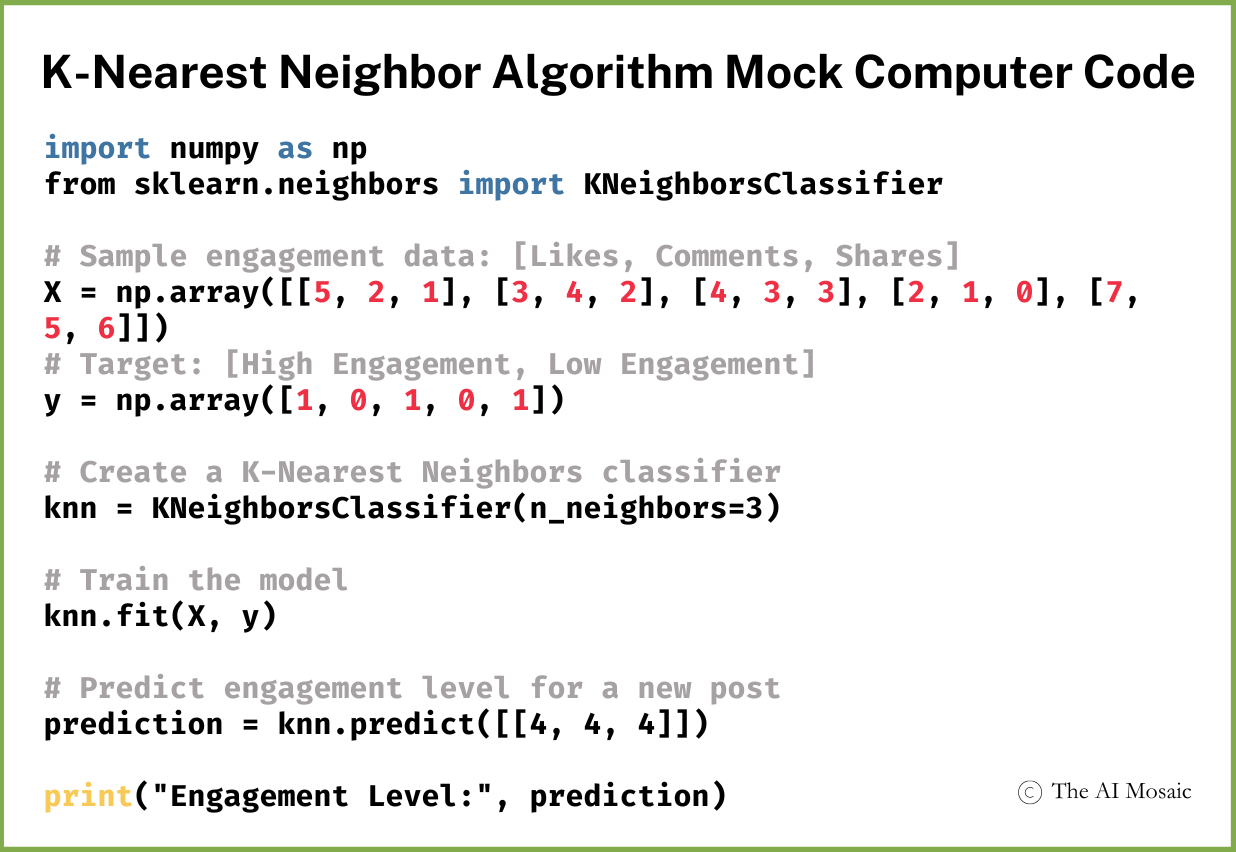
The K-NN Algorithm Step-by-Step
The K-NN algorithm is a bit more abstract than the Decision Tree algorithm. But like all algorithms, it too follows a set of steps. Here’s what’s happening when the K-NN algorithm is active:
Step 1: Analyze Your Past Engagement
Before the algorithm can make predictions, it starts by analyzing your past interactions—the posts you've already liked, commented on, or shared. Your previous engagement activity is key. Each post you’ve engaged with gets plotted as a data point on a graph by the algorithm. This metaphorical graph represents how you've previously interacted with various topics or content types.
Step 2: The Algorithm Evaluates the Features of a New Post
When a new post appears, it has certain features one or share a similar tone or style to posts you've engaged with before. The algorithm evaluates these features (like content, topic, style, etc.) and compares them to the posts you’ve engaged with in the past, essentially asking: “Is this post similar to any of the content the user has liked or shared before?”
Step 3: The Algorithm Looks for Similar (Nearest) Past Posts
Next, the algorithm identifies which of your past posts are most like the new post. These are called the “nearest neighbors.” If the new post is about one of your interest areas, it will look for similar past posts where you engaged highly—such as liking, sharing, or commenting on posts about that interest. The idea is that similar past posts will be “close together” on the “graph” because your engagement with them was comparable.
Step 4: Using Past Engagement to Predict Future Engagement
Once the algorithm identifies the nearest neighbors, it uses this data to predict how you will interact with the new post. If you've shown high engagement with several similar posts, the algorithm predicts that you’re likely to engage with this new post in a comparable way. This is why you often see new content that reflects the topics you’ve already liked or shared—it's based on your past behavior.
Below is a visual representation of how the algorithm works. It’s helpful to keep this in mind about the K-NN algorithm. When the algorithm is looking for the “nearest neighbors,” it means it’s finding past posts that are most like the new post in terms of content and features. Based on how you engaged with those past posts, the algorithm predicts how likely you are to engage with the new post it’s considering showing you.
In the graphic, the center circle represents your current interests, which shift based on your recent engagement. The surrounding circles—such as photography, travel, DIY, and music—represent different topics. The largest and closest circles, like photography and travel, indicate your strongest interests in the moment.
As new posts appear from various sources (such as friends, public pages, or recommended feeds), the algorithm compares them to these interest circles, prioritizing posts that align closely with your top interests while still considering those tied to your less active ones.
As the algorithm gathers more data from your interactions, it adjusts its predictions. If it notices that you consistently engage with certain types of content—like posts about photography, travel, or DIY projects—it will show you more posts with similar content.
This process doesn’t depend on how others interact with those posts; it's based entirely on your own behavior. Over time, as the algorithm receives more data, its predictions about what you'll engage with should become more accurate.
Algorithms: From Recipes to Resumes
As we’ve explored, algorithms—defined as a series of steps to reach a goal—aren’t just confined to the world of computers. We encounter them in our daily lives, whether it’s finding the Least Common Multiple (LCM) in math class, following a recipe to bake a pie, or strategizing in a game of chess. Just like these everyday algorithms guide us through specific tasks, computer and AI algorithms work similarly, but with the added complexity of processing vast amounts of data at high speed.
While basic algorithms like QuickSort follow a fixed set of rules, AI algorithms, such as the Decision Tree and K-Nearest Neighbor, take things a step further by adapting to new information and learning from it. This adaptability allows them to make more personalized and accurate predictions, whether it’s filtering resumes for a job opening or influencing your social media feed.
Understanding how these algorithms work helps to clarify the technology at work behind the scenes. Hopefully, it also empowers you to navigate the digital world more effectively. As AI evolves, these algorithms will become even more integral to our interactions with technology. The better we understand them, the better we can adapt to—and even anticipate—the changes they bring in shaping our digital experiences.